
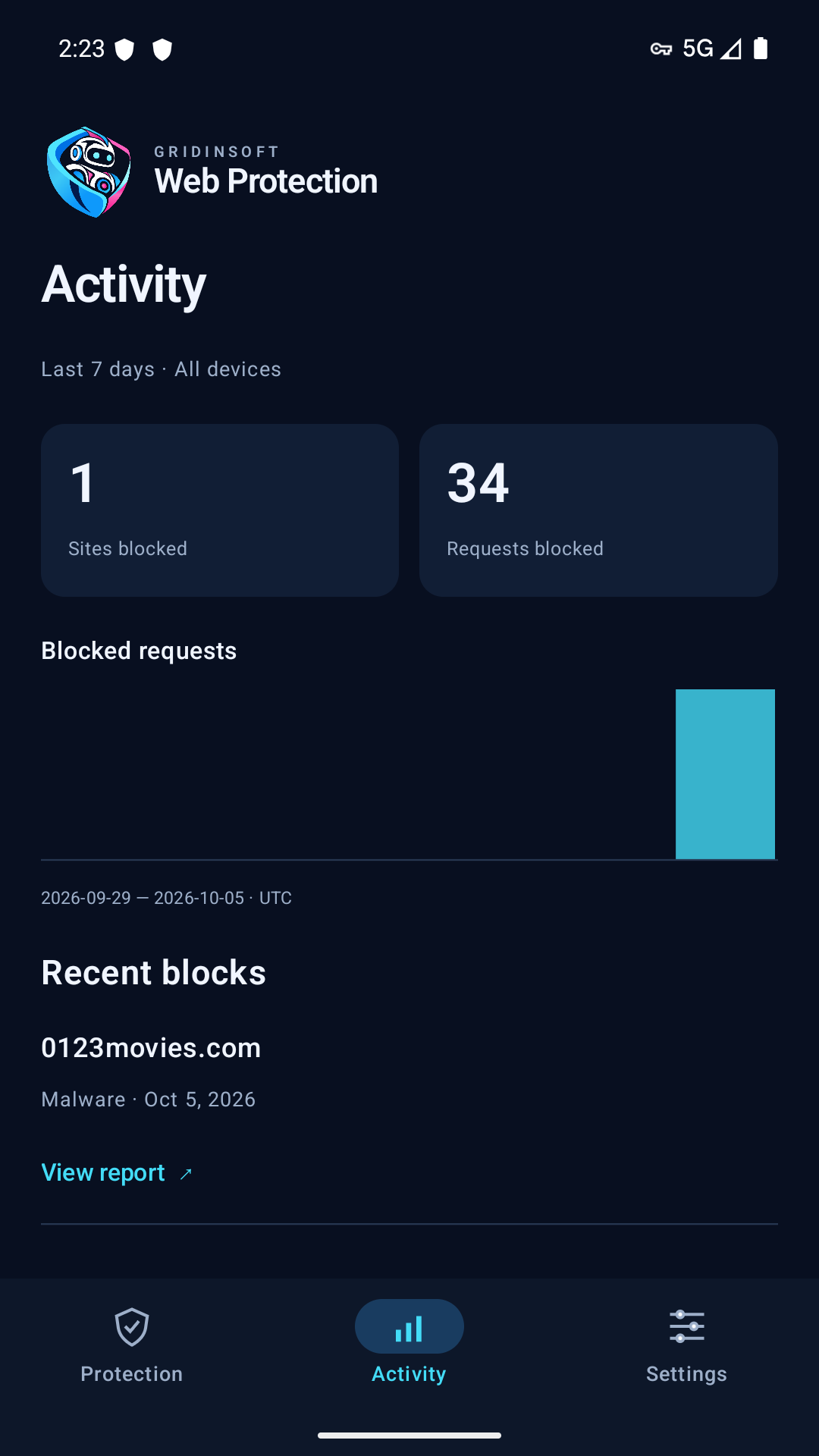
Open Activity to review recent blocking activity. The current Android screen shows the last seven days; its chart uses UTC dates. Check the scope label before comparing numbers.
Requests and domains count different things
- Sites blocked / Domains blocked counts distinct blocked names within the displayed scope and period.
- Requests blocked counts DNS requests. One domain can generate many requests because of retries, different DNS record types, or background apps.
- All devices is account-wide activity. An unsaved guest installation shows This device instead.
These numbers are not a count of website visits, infections or people attacking your phone. A request can happen without opening a browser.
Review a block safely
Find the domain in Recent blocks and use View report when available. This opens the Gridinsoft security report. A missing category or report link means those details are not available yet; the app should not invent them.
The Latest block card on Protection is a separate local record for this phone. It covers recent alerts from the device and can differ from account totals.
Empty, partial or old activity
Use Refresh and check the last-update time. Collection can take time, and a failed refresh may leave saved data on screen. A zero count is not evidence that protection is off; a stale count is not proof that it is on. Check the Protection tab for the current connection state.
The Check a website shortcut opens the online reputation checker. Its report is separate from confirming this phone's active DNS connection.