
Internet Security is Gridinsoft Anti-Malware's real-time web protection layer. It checks the sites and download locations your computer connects to and warns you before known malicious or deceptive content can cause harm.
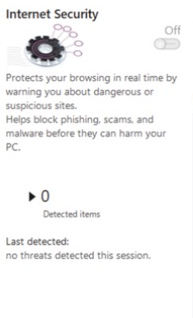
What it can block
- Phishing pages and fake sign-in forms designed to steal credentials.
- Sites known to distribute malware, unwanted programs, or dangerous downloads.
- Compromised pages and redirect chains associated with scams or exploit activity.
- Connections covered by the protection categories selected in the app settings.
Internet Security complements file scanning and behavioral protection. It is not a VPN, ad blocker, parental-control service, or replacement for browser and Windows updates.
Enable and configure Internet Security
- Open Gridinsoft Anti-Malware.
- Select Protect.
- Turn on Internet Security.
- Open Settings → Internet Security to review the available filtering options.
The module needs a supported Windows version, an active license, and a current Threat List. If the switch is unavailable, follow Internet Security toggle is off or unavailable.
When a page is blocked
- Do not enter passwords, payment details, or download files from the page.
- Check the address carefully for misspellings, unexpected subdomains, and look-alike characters.
- If you do not recognize the site, close the page and run a scan if anything was downloaded.
- If you are certain the site is legitimate, verify it independently before creating an exception.
If a trusted site is blocked
Open Tools → Ignore list → Internet and add the narrowest safe exception. Prefer one exact URL over an entire domain whenever possible. See A site I trust is being blocked for the complete procedure.
If you believe the classification is wrong, report it to Support with the blocked URL and a screenshot. Do not permanently allow the site only to dismiss a warning.
Performance and compatibility
The check is designed to add minimal delay. If pages become noticeably slower, make sure the Threat List is current, restart the app and browser, and avoid running overlapping web filters from several security products. Review Will Internet Security slow down my browsing? before disabling protection.